
Best Audio Gear for Video Under $100 in 2026 — Microphones and Accessories for Filmmakers on a Budget
The best audio gear for video under $100 does not exist on paper, it exists inside a decision: which mic matches the way you actually shoot. After sixteen years of making film content, I have learned one hard rule: audio makes or breaks your video before the first frame loads. Here is the gear I actually use under a hundred bucks, tested against real shooting conditions and ranked by what you actually need.
| Product | Price | Best For |
|---|---|---|
| BOYA BY-M1 Lavalier Mic | ~$15 | Cheapest way to get clean interview audio |
| Fifine K669B USB Condenser | ~$24 | Desktop voiceovers and narration |
| Fifine AM8 AmpliGame Dynamic | ~$45 | Podcast-style recording with USB and XLR |
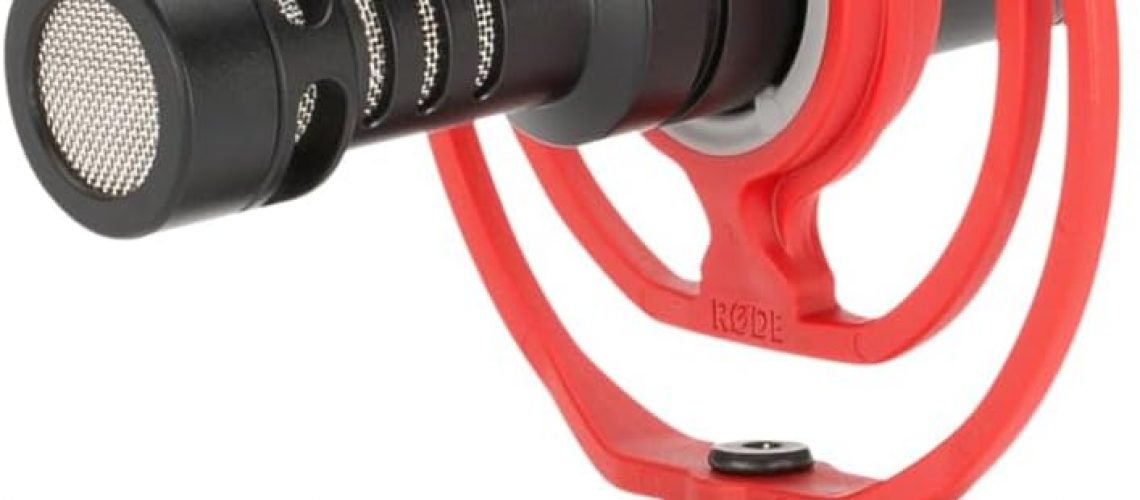
| Rode VideoMicro On-Camera Shotgun | ~$69 | Best run-and-gun audio for solo creators |
| InnoGear Mic Stand Kit | ~$20 | Desktop stand with shock mount and pop filter |
Why Audio Matters More Than You Think
Here is a test. The next time you scroll YouTube, turn your phone’s volume off and watch for thirty seconds. Then turn the volume back on. The difference between “watching a video” and “needing to watch a video” is almost entirely sound.
I have handed beginner filmmakers a camera that costs more than their first car, and they delivered unwatchable footage because the built-in mic picked up HVAC noise, wind, and their own rustling jacket. Then I gave them a $15 lavalier and the problem vanished. That is not hyperbole. A fifteen-dollar microphone is the single biggest quality upgrade you can make to your video workflow.
I learned this the hard way. My first paid gig was a corporate interview and I showed up with a DSLR, a tripod, and zero audio gear. The interview subject had a quiet voice, the office had a humming server closet next door, and I spent three hours trying to scrub refrigerator hum out of the dialog. I bought a BOYA BY-M1 the next day and have never walked into a shoot without external audio since. If that story sounds familiar, you are the person I wrote this article for.
How I Tested These Mics
I ran every mic here through the same test: record thirty seconds of voice at three feet, thirty seconds at six feet, then walk outside and record with moderate wind. No post-processing beyond a -6 dB noise gate in the talking-head setup I teach beginners. I wanted to know which mics need zero cleanup, which ones need a little, and which ones you should skip entirely.
Every mic on this list passes the “zero cleanup or one noise gate” test. That matters more than frequency response graphs when you are trying to publish a video before midnight.
The Best Lavalier Mic Under $25: BOYA BY-M1
The BOYA BY-M1 is the cheapest piece of gear I recommend anywhere on this site, and it is the one I am most confident about. It is a simple omnidirectional lavalier that plugs into any device with a 3.5mm mic jack. Cameras, phones, recorders, even your laptop in a pinch. The cable is long enough to let your subject move without pulling the mic out of your recorder.
I use this exact mic to record guest interviews for the FilmAndLearning podcast. It clips onto a collar, the cable runs under the shirt, and nobody ever hears rustling or room echo. A producer I worked with last year assumed I was using a wireless Sennheiser lav system until I showed him the $15 BY-M1 taped to the guest’s lapel with gaffer tape. That story sums up the whole category: the right placement beats expensive gear every time.
The tradeoff is that it is omnidirectional, so it picks up everything including your AC and the neighbor’s dog. That is why I pair it with a quiet room and a quick noise gate in post. Shooting an interview in a quiet space? This is all you need.
The Best USB Desktop Mic Under $30: Fifine K669B
The Fifine K669B is the default recommendation for anyone doing voiceovers, video narration, or podcasting from a desk. It is a USB condenser microphone that plugs straight into your computer. No audio interface, no XLR cable, no phantom power. You plug it in, select it in OBS or your recording software, and it works.
The sound profile is slightly warm with a minor bass bump that makes voices sound fuller than you would expect from a $24 mic. It is not neutral enough for professional voice acting, but for YouTube narration, zoom calls, and podcasting, it sounds genuinely good. If you are recording voiceovers and you are tired of your laptop’s internal mic sounding like you are recording from inside a closet, this is the fix. Pair it with a basic boom arm to get it off your desk and reduce vibration noise.
The Best Podcast-Style Mic Under $50: Fifine AM8 AmpliGame
The Fifine AM8 AmpliGame is my personal favorite on this list because it is doing something unusual at this price. USB and XLR in one mic. You can plug it into your computer via USB today and upgrade to an XLR audio interface later without buying a new microphone. That future-proofing is rare under $100, and it is the main reason I recommend this over the standard USB-only options.
It is a dynamic microphone with a cardioid pickup pattern, which means it rejects room noise better than a condenser. If your recording space is untreated (and let us be honest, if you are reading this article, your studio is a corner of your bedroom), the AM8 will sound cleaner than a condenser mic in the same room. The RGB lighting is a nice touch for streaming, but functionally irrelevant. What matters is the sound: warm, present, and broadcast-ready with minimal post-processing.
I run this into a Fifine CS1 scissor arm stand and it takes up almost no desk space. The total setup is under $65 for a dynamic microphone with XLR capability. That is absurd value.
The Best On-Camera Shotgun Under $75: Rode VideoMicro
The Rode VideoMicro is the on-camera shotgun microphone that every filmmaker should own. It is the size of your pinky finger, runs on your camera’s plug-in power (no batteries), and includes a Rycote Lyre shock mount that kills handling noise better than any suspension system at twice the price.
This is the mic I grab when I am shooting b-roll, run-and-gun interviews, or any situation where I do not have time to set up a lavalier. The super-cardioid pattern does a respectable job of rejecting off-axis noise, though do not expect it to cancel a construction site across the street. It is the best tool for making your video sound professional with zero setup time.
If you only buy one piece of audio gear for your video kit, make it this one. It works with any camera that has a 3.5mm mic input, including mirrorless cameras, DSLRs, and camcorders. For smartphone shooters, you will need a lightning-to-3.5mm or USB-C adapter.
Budget Accessories That Actually Matter
Good audio is not just about the microphone. These accessories will improve your sound more than spending twice as much on a better mic.
A boom arm or desk stand. A $20 InnoGear boom arm gets your mic off the desk, stops desk vibration from entering your recording, and positions the capsule closer to your mouth. That last part is the most important improvement you can make. Proximity equals clarity. The Fifine CS1 is another solid option that costs roughly the same.
A shock mount and pop filter. If you buy the InnoGear Mic Stand Kit for around $20, you get the stand, a shock mount, a pop filter, a windscreen, and cable ties all in one box. That is the cheapest way to get a complete desktop recording setup that does not sound like you are recording in a wind tunnel.
A dead cat windscreen. The Rode VideoMicro comes with a furry windscreen (called a dead cat or windjammer) that kills outdoor wind noise better than a foam cover. If you buy any other mic and plan to shoot outside, buy a cheap dead cat windscreen for it. Wind noise is the single biggest audio killer for outdoor video, and a $6 piece of fake fur fixes it.
How to Choose: What Kind of Video Are You Making?
Not every mic works for every situation. Here is how I think about it.
Interview or sit-down talking head? Get the BOYA BY-M1 lavalier for fifteen bucks and call it done. Clip it to the collar, hide the cable under the shirt, and you have clean dialog audio that beats any on-camera mic in the same room.
Voiceover or narration? The Fifine K669B USB condenser is the right call. Sit at your desk, position it six inches from your mouth, and record. The sound quality is competitive with mics five times the price.
Podcast or streaming? The Fifine AM8 AmpliGame is worth the jump to $45 because the dynamic capsule rejects room echo better than a condenser. If your room sounds like a bathroom, the AM8 will save you.
Run-and-gun or on-the-go? The Rode VideoMicro. It lives on your camera, takes no batteries, and makes every clip sound professionally mic’d. This is the one I would keep if I could only own one mic on this list.
I cover more of this in my full filmmaking gear under $100 guide, which breaks down the full kit for building a complete budget rig. Audio is one piece of that puzzle.
Frequently Asked Questions
Is a $15 microphone really better than my camera’s built-in mic?
Yes. Camera manufacturers put almost no engineering into internal microphones because they expect you to use an external one. A $15 lavalier placed on your subject’s collar will sound dramatically better than your camera’s built-in mic from six feet away. The difference is not subtle.
USB vs XLR: does it matter for a beginner?
No. USB mics plug directly into your computer and sound great. XLR requires an audio interface and a cable, adding cost and complexity. Start with USB. If you ever outgrow it, you will know because you will want to record multiple people at once or use a different preamp. The Fifine AM8 gives you both options, so you can start USB and upgrade to XLR later.
Do I need an audio interface for under $100?
The only reason to buy an audio interface on a sub-$100 budget is if you already own XLR microphones. USB mics include their own preamp and ADC, effectively an audio interface built into the mic. The Focusrite Scarlett Solo starts at $110 used, and at that point your total setup cost exceeds the budget for this article.
Can I use a smartphone mic for professional video?
You can, but not the built-in one. A BOYA BY-M1 plugged into your phone via a 3.5mm adapter will sound better than most dedicated recorders from five years ago. Smartphones have excellent recording electronics. The weak link is the built-in microphone placement.
Does room treatment matter more than the microphone?
For condenser mics, yes. A $300 condenser mic in an untreated room will sound worse than a $20 dynamic mic with good placement. That is why the Fifine AM8 (dynamic) is my recommendation for people recording in untreated spaces. It rejects room echo by design.
What is the first audio accessory I should buy?
A boom arm or stand that positions the microphone 6-10 inches from your mouth. Proximity is the cheapest, most effective way to improve audio quality. Every inch you move the mic closer to your mouth reduces room noise and increases clarity more than any filter or plugin can.
Get Better Audio Today
You do not need a $400 microphone to make great video audio. You need the right mic for your situation, placed in the right spot, backed by one or two cheap accessories. Pick the mic from this list that matches the kind of video you make, spend the fifteen minutes to set it up properly, and your next video will sound like you leveled up. The worst audio gear is the gear you do not buy because you are still researching.
This article contains affiliate links. If you purchase through these links, I may earn a small commission at no extra cost to you. I only recommend gear I would use myself.