
Your video is grainy because the sensor did not get enough light and the camera amplified the signal to save a dark frame. That grain is noise, and it shows up the most in shadows and low-light shots. The good news is the fix is rarely a new camera. It is learning to expose right, control your ISO, and add a little light on purpose.
| Aspect | Key Takeaway |
|---|---|
| What causes grain | Noise appears when the sensor gets too little light and ISO gets pushed hard |
| The free fix | Expose brighter in camera instead of lifting a dark clip in editing |
| Keep ISO low | Lower gain plus a little extra light beats cranking ISO every time |
| Budget light | A ~$50 LED panel fixes more low-light problems than a new camera body |
| Post cleanup | DaVinci Resolve free noise reduction tames the worst of it |
Why Is My Video Grainy? The Real Cause of Noisy Footage
Why is my video grainy? Because a small sensor did not get enough light, and the camera pushed the gain up to rescue an almost black frame. Every camera has noise, and the less light you give the sensor, the more that noise gets amplified until it shows up as moving specks.
Think of it like a cheap speaker with the volume all the way up. There is no music loud enough to hide the hiss, because you are amplifying the quiet buzz that was always there. Grain is the hiss of your sensor.
I learned this the hard way at a client interview shot in a dim office. I blamed my lens and my autofocus for an hour before I noticed a fingerprint dead-center on the front element. The real problem was I had starved the sensor of light, then tried to fix it in the grade, and every push made the grain worse.
The Free Fix: Expose Correctly Before You Hit Record
The cheapest fix for grainy video costs nothing, and it happens before you ever press record. Expose the scene brighter in camera instead of shooting dark and lifting it in editing. A slightly overexposed frame graded back down is clean, while an underexposed frame pushed up is pure noise.
Set your exposure so the image looks right on the camera or on a field monitor, not so the shadows feel safe and dark. If you are not sure, check your histogram and keep the bulk of the data out of the left side of the graph. That one habit kills more grain than any plugin.
On a fast-moving client promo I used to underexpose on purpose to protect highlights, then fight the noise in post for hours. The fix was exposing for the subject instead and letting the background fall off naturally. The footage went from grainy to clean in a single shoot.
The Budget Fix: Add Light Instead of Chasing ISO
Once your exposure is right, the next lever is your ISO. Every camera has a base ISO where the sensor is cleanest, and the grain starts climbing the moment you raise it. So instead of pushing ISO higher in a dark room, put a little more light on the scene and drop the gain back down.
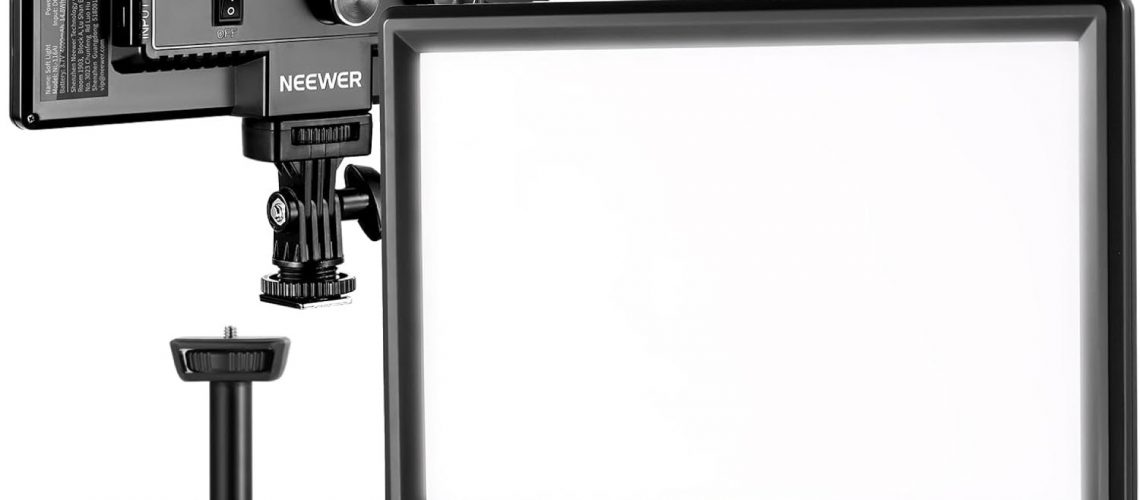
You do not need a cinema light to do this. A small dimmable panel like the NEEWER 9 inch LED Video Light Panel for about $50 lets you raise a subject face out of the mud and keep your ISO where the sensor is happy. It is the single biggest low-light upgrade you can make for less than a tank of gas.
If you want the full guide to shaping light on a budget, my lighting setup on a budget article walks through windows, bounce boards, and cheap panels in more depth. And my ASA, ISO, and EI guide shows you exactly where the clean zone of your sensor lives. The principle is the same everywhere: more usable light means less noise.
I keep a couple of compact panels in my run-and-gun bag precisely for this. When a wedding reception went dark or a client walkthrough was a cave, I set up a panel, dropped my ISO, and the grain disappeared without me touching the grade.
Fix Noise in Post Without Buying Plugins
Even with good exposure and a light, some shots come back noisy, and you will want a cleanup pass. You do not have to buy a plugin for this. DaVinci Resolve ships a free noise reduction tool that handles most grain without turning your footage to mush.
Open the clip, add a serial node in the color page, and dial in just enough temporal noise reduction to settle the moving specks. The mistake is cranking it to zero. You want the grain gone, not the detail along with it.
My full breakdown of DaVinci Resolve 21 covers the noise reduction controls and where they sit in the color workflow. It is a free download, so you can run the entire cleanup pass without spending a dollar.
On one budget doc I finished the whole cleanup in Resolve after the client balked at a paid plugin. The export was clean enough that nobody asked what software I used.
When Grain Is Actually Fine
Not every speck on screen is a mistake. A little noise reads as natural film grain, and it beats the alternative, which is footage that looks smeared and plastic from over-smoothing.
The trick is knowing the difference. Big, alive grain that moves with the shadows can pass as texture. Flat, color-blocky noise in a smooth wall or a face is the kind that screams cheap.
I have kept mild grain in a moody interview cut rather than crush it into a waxy look, and reviewers called it cinematic. The same clip with the noise reduction maxed looked fake. Learn to let the sensor breathe a little.
For more on the sharp side of this coin, my why your video is blurry article explains focus and detail. Grain and softness are opposite problems with the same root cause: not enough clean signal.
Frequently Asked Questions
Does a higher ISO always make my video grainy?
Mostly yes, but the jump is not even. Raising ISO a little from base adds some noise, and the curve climbs fast as you go higher. Stay as close to base ISO as your light will allow.
Is it better to brighten a dark clip in editing or fix it in camera?
Fix it in camera. Lifting a dark clip in post amplifies noise that is already baked into the file. Exposing brighter at the shoot and grading back down gives you a clean, flexible frame.
What is the best budget light for low-light video?
For most beginners a dimmable, bi-color LED panel around $50 is the sweet spot. It lets you shape light and keep ISO low without a big setup. The NEEWER panel I use is a strong starting point.
Does noise reduction make my footage look soft?
It can if you overdo it. Heavy temporal noise reduction smears fine detail and turns skin waxy. Use the smallest amount that settles the grain, and check the result at full size.
Do I need a full-frame camera for low-light video?
No. A full-frame sensor handles darkness better, but a budget camera with good exposure and a small light beats a full-frame body shot in a dark room. Spend the money on light first.
The Move
Grainy video is a light problem, not a money problem, and the fix starts with two free moves you can test tonight. Now go shoot something.
I remember walking onto a run-and-gun set with nothing but a rented camera, a cheap LED panel, and a handful of clips, and the footage came out cleaner than jobs shot on gear three times the price. The difference was never the kit. It was bringing light, exposing right, and trusting the tools I already had.
Some links in this post are affiliate links. If you buy through them, I may earn a small commission at no extra cost to you. Helps keep the lights on around here. Thanks, Mark.