
Why is my video shaky? I have lost count of the clips I shot that looked like they were filmed from the back of a moving truck. The good news is that shaky footage almost never means you need a better camera, and most of the time you can fix it for free.
Why Is My Video Shaky in the First Place
Why is my video shaky? It is rarely your hands. It is usually a shutter speed problem, a focal length problem, or a support problem, and most beginners get all three wrong at once. Start by checking these three things before you spend a cent.
The biggest culprit is a slow shutter speed. When you shoot indoors or in low light, your camera drops the shutter to let in more light, and a slow shutter makes every small hand movement smear across the frame. The second culprit is a long lens, because telephoto magnification turns a tiny wobble into a huge sway. The third is simple: you are not supporting the camera, so it is doing exactly what your body does.
Here is the practical test I use. Set your shutter to about twice your frame rate, shoot a handheld clip for ten seconds, then shoot the same clip resting the camera on a table. Compare the two on your timeline. That ten-second experiment teaches you more about stabilization than any manual I have read.
Fix It for Free: Shooting Technique
Before you buy anything, fix the way you hold the camera. You can eliminate a huge amount of shake with technique alone, and I still use these moves on paid jobs.
Brace yourself against something solid. Leaning on a door frame, a table, or a parked car turns your body into a tripod, and it is the single fastest way to calm handheld footage. Tuck your elbows into your ribs, and breathe out before you start recording instead of holding your breath.
Peter McKinnon preaches a version of this in every handheld video he shoots, and you can watch him brace against whatever is nearby on his YouTube channel. The other free fix is to move your feet instead of panning, which is what Casey Neistat does when he walks and talks, letting the whole body absorb the motion instead of just the wrists.
Fix It in Post: The Free Stabilizer
Even with good technique, some clips need a rescue in editing. Both DaVinci Resolve and CapCut have free built-in stabilization tools, and this is where I fix the footage I did not shoot right.
In DaVinci Resolve, select the clip, open the Inspector, and turn on stabilization. Set Smoothness to around 50 percent, let it analyze, and render a preview. The algorithm watches the clip and warps the frame to cancel out the motion, and it saves more shaky footage than any accessory I own.
Use stabilization as a rescue, not a habit. Heavy stabilization crops the edges of your frame and can leave a wobbly look in the corners, which is why I keep the smoothness moderate. It is the cheapest fix in filmmaking, and it costs nothing beyond the editing time.
The $14 Fix: A Flexible Mini Tripod
If you shoot with a phone or a small camera on a desk, a flexible mini tripod is the best value in stabilization. It costs less than a round of drinks, and it fixes the support problem at its root.
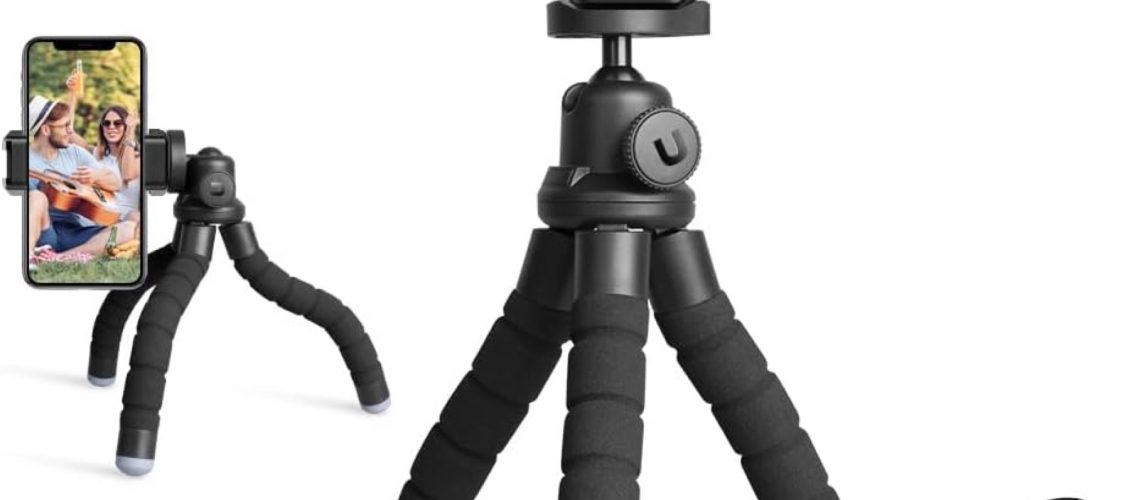
The Ubeesize Phone Tripod with a wireless remote is the one I keep in my bag at 14 dollars. Its legs bend around a fence rail, a tree branch, or a chair back, so you can lock the camera down almost anywhere instead of holding it. The wireless remote lets you start and stop recording without touching the phone, which removes the touch-induced shake that ruins so many phone clips.
I use this exact tripod to record quick talking-head clips for the Film and Learning channel, and the remote means I can position myself and shoot without running back to tap the screen. It will not replace a real stabilizer for walking shots, but for anything static it is the cheapest way to make your video look intentional.
One warning: the flexible legs are great on rough surfaces and useless on smooth glass. If you set it up on a polished desk, the legs can creep, so give the phone a nudge to seat it before you hit record.
The $24 Fix: A Full-Size Phone Tripod
When you need the camera at eye level instead of on a desk, step up to a full-size phone tripod. This is the piece that turns a solo creator into someone who can frame a proper shot.
The EUCOS 62-inch Phone Tripod at 24 dollars extends to eye height and comes with a remote shutter, so you can set up, frame yourself, and record without holding anything. For talking heads, interviews, or product shots, this replaces the “lean the phone against a mug” approach that everyone starts with and no one should keep.
I use a tripod like this for interviews and b-roll where the camera has to sit still for minutes. It is why smartphone filmmakers like those following our smartphone filmmaking guide can hold a locked-off frame, and a locked-off frame reads as professional even when the gear is cheap.
What nobody tells you about cheap full-size tripods is that the legs are plastic and the head can sag under a heavy camera. It is perfect for a phone, fine for a small mirrorless, and not built for a cinema rig.
The $75 Fix: A Phone Gimbal
If you actually need to walk and shoot smooth footage, no tripod will save you. That is what a motorized gimbal is for, and the DJI Osmo Mobile 7 at 75 dollars is the one I recommend for moving shots.
A gimbal uses small motors to counter your hand movements, so the camera stays level while you walk. The Osmo Mobile 7 adds ActiveTrack, which keeps a subject framed as you move, and a built-in tripod for the times you want it to sit still.
You see this look in every travel vlog that feels smooth, and it is why creators like Gerald Undone test gimbals so carefully in their reviews. The motorized stability does in real time what the post tools do in editing, and it means you can shoot the clip right instead of fixing it later.
The trade-off is that a gimbal has to be charged, balanced, and carried. It is more to manage than a tripod, and if you mostly shoot static scenes, the 24 dollar tripod is the smarter buy.
Frequently Asked Questions
Why is my video shaky even when I hold the camera still?
Because a slow shutter speed is smearing every tiny hand tremor across the frame. Set your shutter to about twice your frame rate, or add light so the camera does not slow down, and the shake will drop dramatically.
Can I fix shaky video after recording?
Yes. DaVinci Resolve and CapCut both have free stabilization tools that analyze the clip and cancel out the motion. It crops the edges a little, so keep your smoothness moderate and leave some headroom when you shoot.
What is the cheapest way to stabilize a phone?
Brace against something solid and use good technique first, because that costs nothing. When you need a real fix, a flexible mini tripod at around 14 dollars is the cheapest accessory that actually solves the problem.
Do I need a gimbal for YouTube videos?
Only if you shoot a lot of walking footage. For talking heads, tutorials, and desk content, a tripod is cheaper and gives a steadier locked-off frame.
Does image stabilization on the camera help?
It helps a lot for handheld shake, but it is not magic. In-body stabilization smooths small movements while you shoot, and combining it with good technique is the best free upgrade most beginners can make.
The Move
Run the ten-second test tonight, set your shutter correctly, and brace against something solid before you record. That one evening of practice fixes more shaky video than any gear you can buy, and it costs nothing.
Once you have the technique down, pick the one support that fits how you actually shoot. When you are ready to upgrade the rest of your kit, our guide to filmmaking gear under 100 dollars is the natural next read.
This article contains affiliate links. If you purchase through these links, I may earn a small commission at no extra cost to you. I only recommend gear I would use myself.